 blog
7 Ways to Label Unpaired Products in Warehouse Bins
Last Updated: November 5, 2026
Quick Summary
The best way to label unpaired products is to use durable, readable bin labels that show the item name, its set position such as Box 1 of 2, the missing part, a status code, and the date received. Keep one partial set per bin and place the label where it can be read from the aisle. Consistent labels let you find and match partial sets quickly.
- Use one partial set per bin so labels stay trustworthy.
- Include item name, set position, missing part, status code, and date received on every label.
- Use status codes HOLD, MATCH, READY, and CLEAR so everyone reads the same meaning.
- Test label adhesion on a bin and stack others on top before labeling a whole shelf.
- Keep one log that matches your bin labels and update it the same day you move a bin.
Table of Contents
- Why Unpaired Products Get Lost in Warehouse Bins
- Choosing Label Types That Survive Handling
- Building a Warehouse Bin Labeling System for Partial Sets
- What to Write on Each Label: Fields and Status Codes
- How to Track Unpaired Inventory from Pallet to Pickup
- Labeling Incomplete Product Sets Before a Meetup
- Setting Up an Inventory Tracking Spreadsheet for Liquidation Stock
- Start Matching Your Unpaired Products on Find The Other Box
- Frequently Asked Questions
Why Unpaired Products Get Lost in Warehouse Bins
If you buy liquidation pallets, you already know the problem. A pallet arrives with a mix of items, and some of them are only half of a set: one lid, one base, one cord, one "Box 1 of 2." Find The Other Box exists because those partial pieces pile up fast and lose their value the longer they sit unlabeled.
Unpaired products get lost for a simple reason. Nothing about a single box tells you what it belongs to, what is missing, or whether a match is coming, so a clear way to label unpaired products is essential. Without a clear label, the item looks like ordinary stock, gets shelved with the wrong group, and sits there until someone forgets it was ever a partial set.
Good labels fix that. A label that names the item, the set it belongs to, and its status turns a confusing box into something you can act on. Below, we walk through seven practical ways to label unpaired products in warehouse bins so they stay findable and ready to match.
Choosing Label Types That Survive Handling
Unpaired products sit in bins longer than regular stock. A partial set may wait weeks or months for a matching piece to surface, and during that time the bin gets moved, restacked, and searched. A label that fails in the first month leaves you with a bin of mystery items, which is exactly the problem you are trying to solve.
Choose label materials based on how long the item will sit and how often the bin gets touched:
- Thermal-printed adhesive labels for bins that stay on a shelf for months. They resist smudging and read clearly at a glance, but check that the adhesive is rated for plastic or metal bins, not just cardboard.
- Removable adhesive labels for bins that get reassigned when a match is found. They peel cleanly so you can relabel the bin for the next partial set without scraping residue.
- Dry-erase or chalkboard labels for status fields you expect to update often, such as moving an item from HOLD to MATCH. Keep the status code in dry-erase and the permanent item details on a printed label so a careless sleeve wipe does not erase the item identity.
- Clear sleeve holders for labels you want to swap without re-sticking. They work well on bins that move between shelves or between resellers at a meetup.
Printed text reads faster across an aisle and is easier to match against a spreadsheet or a partner's list.
Test one label before you commit to a whole shelf. Stick it to a bin, stack two more bins on top, and check it the next day before labeling the rest of your partial inventory.
Watch out: clear bins are the most common labeling failure point. A label stuck to a clear plastic bin can look fine on the shelf but become unreadable when the bin is full of dark items, so place a white or light-colored label backing behind the text or use an opaque label on the front face.
Building a Warehouse Bin Labeling System for Partial Sets
A label system only works if every bin follows the same pattern. Start with a simple rule: one bin holds one partial set or one group of related partials. Never mix unrelated sets in the same bin, or the label stops being trustworthy.
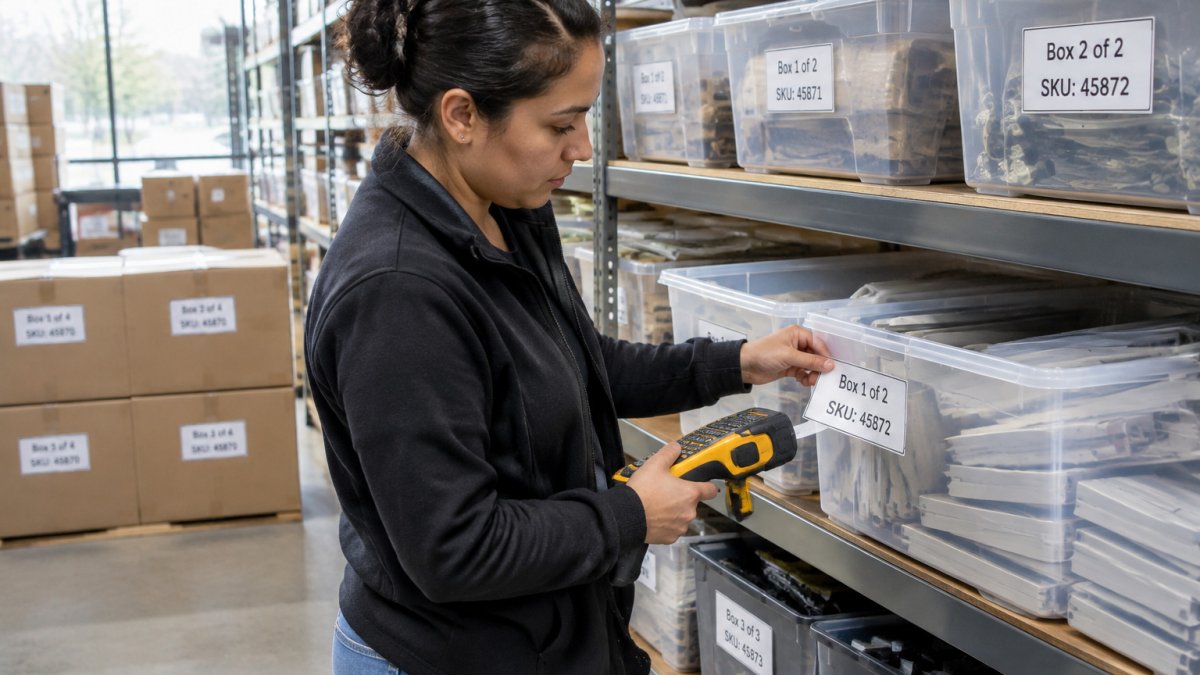
Set up your bins in a clear order:
- Group bins by product category first, such as electronics or kitchen items
- Assign each bin a unique location code, like A-03-2
- Place the bin's contents list and status on the front, visible from the aisle
- Keep the same spot for each label so your eye knows where to look
Consistency matters more than perfection. If every bin uses the same format, you can scan a shelf in seconds and spot the partials that need a match. If each bin uses its own style, you will waste time hunting for the information you need.
What to Write on Each Label: Fields and Status Codes
The label itself carries most of the value, so decide what goes on it before you start printing. A useful partial-set label usually includes:
- Item name: the product as you would describe it to a buyer
- Set position: for example "Box 1 of 2" or "Box 2 of 3"
- Missing part: the piece you still need to complete the set
- Status code: a short code showing where the item stands
- Date received: so you can see how long a partial has waited
Use a short list of status codes so everyone reads the same meaning. Keep the list small:
- HOLD: waiting for a match, do not sell yet
- MATCH: a matching partner is lined up for a meetup
- READY: the full set is complete and can be sold or shipped
- CLEAR: the partial is being sold as-is or moved out
Write the status code in large, bold text so you can read it from across the aisle. A label with clear fields saves you from opening every bin just to find out what is inside.
How to Track Unpaired Inventory from Pallet to Pickup
Labels tell you what a bin holds. Tracking tells you what happened to it and whether it is moving toward a match or aging in place. Without a record, a partial set can disappear into storage even when its label is perfect.
Treat unpaired items as a quarantine exception, not as regular inventory. When a pallet is broken down, every partial set goes to a designated HOLD area or HOLD shelf before it goes anywhere else.
Follow these steps for each partial:
- At intake: log the item, its set position, and the missing part the moment it arrives. Assign a status of HOLD and place the bin in the quarantine area.
- At labeling: attach the bin label with the item name, set position, missing part, date received, and status code. The label and the log must agree on every field.
- At matching: when another reseller confirms they have the missing piece, update the status to MATCH and note the partner's name and the planned meetup date. Move the bin to a staging area so it is ready to bring to the exchange.
- At pickup: after the in-person swap, change the status to READY if the set is complete or CLEAR if the partial is being sold as-is. Record the final outcome and the date.
Keep the log in one place. Splitting records across notebooks, texts, and memory is how partials go missing. Update the log the same day you move a bin, confirm a match, or complete a meetup.
A simple status-code discipline makes the log useful at a glance. HOLD means waiting for a match and not sellable. MATCH means a partner is lined up and a meetup is pending. READY means the set is complete. CLEAR means the partial is leaving as-is.
Measure whether the system is working by tracking three things: how many HOLD items you have, how long the oldest HOLD item has waited, and how many matches you complete in a month. If the HOLD count keeps rising while matches stay flat, your labeling or your partner search needs attention before the quarantine area fills up.
Labeling Incomplete Product Sets Before a Meetup
Many resellers meet in person to swap parts and complete sets. A meetup goes faster when both sides know exactly what they are bringing and what they need.
Before you meet another reseller, do these things:
- Check that every bin you plan to bring has a current label and status
- Confirm the exact missing part on both sides, down to the model or version
- Photograph the labels so you can match details quickly at the meeting
- Bring a printed or saved list of the items and their status codes
At the meetup, compare labels against the item in hand before you hand anything over. Mismatched labels cause the most disputes, so a quick check protects both parties. Update your log right after the exchange, while the details are still fresh.
Setting Up an Inventory Tracking Spreadsheet for Liquidation Stock
A spreadsheet is the simplest way to keep your partial-set records organized, and it costs nothing to start. Create one row per item and use the same fields as your bin labels so the two always agree.
Use these columns as a starting point:
| Column | What to Enter |
|---|---|
| Bin Location | The location code, such as A-03-2 |
| Item Name | The product as described on the label |
| Set Position | For example, Box 1 of 2 |
| Missing Part | The piece needed to complete the set |
| Status | HOLD, MATCH, READY, or CLEAR |
| Date Received | The intake date |
| Partner and Pickup Date | Filled in once a match is confirmed |
Sort by Status once a week. Every row marked HOLD is a partial that needs attention, and every row marked MATCH needs a pickup date. This one view shows you what needs action and what is moving.
Start Matching Your Unpaired Products on Find The Other Box
Once your bins are labeled and your log is current, the next step is finding the partners who have the pieces you need. Find The Other Box connects liquidation resellers who hold partial sets with those who have the missing parts.
List the item, the set position, and the missing part exactly as you wrote them, so potential matches see the same clear information you use in your own warehouse. Start with the partials that have waited longest, since they tie up the most space.
Ready to put your partial inventory to work? Start Matching For Free and turn your stranded bins into completed sets.
Frequently Asked Questions
What information should go on a warehouse bin label?
At minimum, put the item description, the set it belongs to (for example Box 1 of 2), a bin or location number, and a status code such as Unpaired, Matched or Ready for Pickup. Adding a quantity and the date you received the item helps later. Keep the text short and in one consistent format so anyone handling the stock can read it at a glance. If you use a barcode or QR code, pair it with readable text so the label still works when a scanner is not nearby.
How do you track unpaired products in a warehouse?
Give every unpaired item a unique bin location, record it in a single inventory sheet with its set number and missing counterpart, and update the status each time it moves. Review the list weekly and flag any item that has sat unmatched for longer than your set threshold. Separate exceptions into their own quarantine bin so they do not get mixed back into sellable stock. A simple audit trail of dates and status changes makes resolution much faster.
Should warehouse bin labels include a barcode or QR code?
A barcode or QR code helps when you have a scanner or when you are checking many bins quickly, but it is not required for a small reseller operation. Printed text is easier to read in a hurry and does not depend on a device. Many resellers use both: a readable description and set number on the front, with a code for quick lookup in their spreadsheet. Choose the option you will actually keep up to date.
How often should warehouse inventory labels be checked?
Check labels whenever you move stock, and do a full review at least once a month. Look for faded text, peeling adhesive and labels that no longer match what is in the bin. Replace damaged labels right away, because a bin with an unreadable label is effectively lost stock. If you are preparing for a meetup or a set exchange, check the labels on those specific bins first.